

Trend Micro Enterprise Security for Endpoints
Immediate protection, less complexity, and greater flexibility for endpoints
Sorry, this product is no longer available, Contact us for a replacement!
Overview:
Protect your desktops, laptops, and file servers
Protecting enterprise endpoints is more complex than ever. Employees are using desktops and laptops, both PCs and Macs, in the office and remotely. In many cases, companies are also running file servers on a variety of operating systems. So how do you protect your end users against threats, while setting them free to work without limits? The answer: an endpoint security suite that supports endpoint flexibility while maintaining security and control, letting you unlock opportunity in your business.
Trend Micro™ Enterprise Security for Endpoints secures your endpoints, both on and off the network with award-winning anti-malware, host intrusion prevention (HIPs), and malicious website protection. This comprehensive endpoint security is powered by Trend Micro™ Smart Protection Network™ cloud-based security delivering global threat intelligence and faster performance. It also offers the flexibility to customize your endpoint protection with add-on options for desktop virtualization, data protection, and mobile device security. Regardless of how you deploy this endpoint security for your business, unified management helps you lower management costs and deliver the industry’s best protection from today’s evolving threats.
Protect your endpoints on and off the network with security that unleashes the power and performance of your desktops, laptops, and servers.
Endpoint/Client Protection
- OfficeScan™ Endpoint Security with plug-ins:
- Security for Mac
- Intrusion Defense Firewall
- Virtual Desktop Infrastructure (VDI) Integration
File Server Protection
- OfficeScan Endpoint Security
- ServerProtect™ for Microsoft® Windows™/Novell™ NetWare®
- ServerProtect for Linux™
Centralized Management
- Trend Micro Control Manager™
Enterprise Data Protection (optional)
- Trend Micro™ Integrated Data Loss Prevention (DLP)
- Trend Micro™ Mobile Security
- Trend Micro™ Endpoint Encryption
- Trend Micro™ Email Encryption Gateway
Protection Points
- Windows PCs
- Macintosh computers
- Microsoft servers
- Novell NetWare servers
- Linux file, web, and application servers
Threat and Data Protection
- Viruses and trojans
- Spyware and rootkits
- Web threats
- Hackers and intruders
- Compliance risks
Advantages
Smart
Lower your risks with proactive threat protection
- Block malware to prevent network downtime, lost productivity, and compliance violations
- Provide immediate protection with Trend Micro Smart Protection Network in-the-cloud threat intelligence for web and file reputation
- Secure your desktops, laptops, and servers with a complete endpoint security suite
- Protect sensitive data everywhere it goes by adding Enterprise Data Protection
Simple
Get the most out of your IT staff and infrastructure. According to Osterman Research, cloud-client endpoint security enables you to:
- Lower endpoint infection rates by 53 percent
- Slash IT security management costs by 41 percent
- Extend PC lifecycle with endpoint performance rated up to 50 percent better by Indusface
- Minimize the drain on endpoint resources by moving pattern files to the cloud and off the endpoint
Security That Fits
Streamline administration by enforcing threat protection policies from a single console
- Centralize policy management across endpoint security and other Trend Micro security products
- Coordinate threat and data protection polices with optional Enterprise Data Protection plus gateway messaging and mail server solutions
- Gain enterprise-wide visibility into threat protection for effective security against targeted attacks and data loss
Features & Benefits:
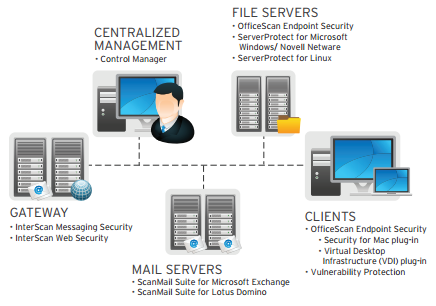
Protect your workforce on a variety of devices on and off the network.
Key Features
Endpoints and Clients
OfficeScan™ Endpoint Security
Maximize your endpoint security and performance with cloud-based, proactive threat protection. An expandable modular, plug-in architecture builds all technologies into a single endpoint agent that is deployed and managed from a single console including:
Security for Mac Plug-in for OfficeScan
Achieve a consistent security deployment and policy across all endpoints, regardless of form factor or operating system with enterprise-class threat protection for Apple Mac laptops and desktops. Flashback, MacDefender, and phishing attacks have shown the need for effective, adaptive protection for Macs.
VDI Plug-in for OfficeScan
Optimize OfficeScan for agent-based virtual desktop infrastructure (VDI) deployments across a range of hypervisors.
Vulnerability Protection
Keep your endpoints shielded until patches can be deployed, or indefinitely for out-of-support or un-patchable legacy systems. We’ll help you prevent vulnerabilities from being exploited with a simple recommendation scan and easy, fast-to-deploy filters
File Servers
OfficeScan
Secure your Windows servers as part of a comprehensive endpoint security framework, consolidating your endpoints under a unified infrastructure.
ServerProtect™ for Microsoft® Windows/Novell NetWare®
Get real-time protection for Microsoft Windows and Novell NetWare web servers and file servers, and prevent them from spreading viruses, spyware, and other web threats.
ServerProtect™ for Linux™
Simplify and automate security operations for Linux servers, and detect malware in real time with cleanup capabilities to help remove malicious code and repair system damage.
Centralized Management
Control Manager
Centrally manage threat and data protection policies across multiple layers of your IT infrastructure, streamline administration, and provide more consistent policy enforcement.
Key Benefits
- Provides immediate protection for endpoints, on or off the network
- Blocks malicious files and websites, and automatically removes malware
- Reduces the impact on the endpoints’ performance and resources
- Allows you to add new security capabilities with plug-in modules, removing the need to redeploy a full solution
- Reduces management complexity and overall costs
- Defends against data loss and reputation damage with optional DLP, encryption, and mobile security
System Requirements:
Trend Micro Enterprise Security for Endpoints creates a solid security foundation across the client layer with broad platform support that provides security for heterogeneous environments and protection for your unique network configuration.
Add Enterprise Data Protection—for Complete End User Protection
Secure your data from gateway to mobile devices by adding Trend Micro™ Enterprise Data Protection, a full set of data security products that integrate within Trend Micro™ Enterprise Security for Endpoints. By combining threat and data protection in a flexible, centrally-managed solution, it lowers the cost of and effort to deploy and manage while closing critical security and compliance gaps—for complete end user protection. Enterprise Data Protection is also available as part of our most comprehensive enterprise security suite: Trend Micro™ Enterprise Security and Data Protection.
Enterprise Data Protection includes these products:
- Trend Micro™ Integrated Data Loss Prevention
- Trend Micro™ Mobile Security
- Trend Micro™ Endpoint Encryption
- Trend Micro™ Email Encryption Gateway
| Multilayered Protection | Platform Coverage | Advantage |
|---|---|---|
| File Server | ||
| OfficeScan | Software: Windows VDI support is available as an add-on | Secures Windows servers |
| ServerProtect for Windows/Novell NetWare | Software: Windows, Novell NetWare, VMware ESX | Secures Windows and NetWare file servers |
| ServerProtect for Linux | Software: Linux | Secures Linux file servers |
| Clients | ||
| OfficeScan | Software: Windows VDI support is available as an add-on | Protects Windows clients |
| Security for Mac | Included plug in for OfficeScan: Apple Macintosh | Protects Macintosh clients |
| Intrusion Defense Firewall | Included plug in for OfficeScan: Windows | Provides proactive HIPS and virtual patching |
| Virtual Desktop Infrastructure | Included plug in supporting range of hypervisors | Agent-based security for VDI deployments |
| Centralized Management | ||
| Control Manager | Software: Windows | Centrally manages security |
Documentation:
Trend Micro Enterprise Security for Endpoints Datasheet (.PDF)